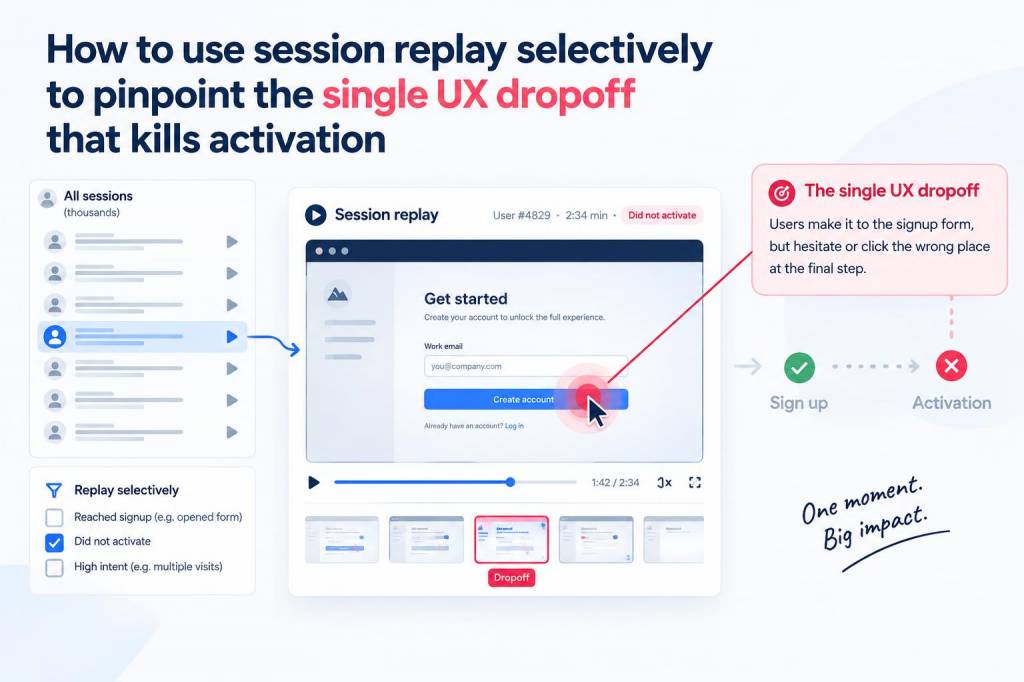
I used to treat session replay tools like black boxes: install the script, wait for a mountain of recordings, and then drown in clips hunting for insights. That changed the day I realized I was chasing noise. A single UX dropoff—one small friction in the activation flow—was quietly wrecking our activation rate, and I needed a way to find that needle in the haystack without watching thousands of videos. This article is the playbook I wrote for myself to use session replay selectively and surgically, so you can pinpoint that one killer dropoff and fix it fast.
Why selective session replay?
Session replay is powerful, but it's also noisy and potentially privacy-sensitive. If you treat it like a surveillance tool you’ll waste time and risk user trust. Using replay selectively means combining it with quantitative signals so you only watch the sessions that matter—those directly connected to activation failures. That saves hours and gives you high-confidence, actionable findings.
Start with a hypothesis and the right metric
Every successful replay-led investigation starts with a clear hypothesis. Ask yourself: what does “activation” mean for this product? Is it completing onboarding, connecting an account, creating the first project, or publishing an item? Define a single, measurable activation event.
Once activation is defined, pick the most relevant metric to segment users. Typical choices:
- Conversion to activation (%)
- Dropout rate at a specific step
- Time to activation (median)
- Feature usage count in first session
Use your analytics tool (Google Analytics, Mixpanel, Amplitude) to find the exact step where activation drops. This gives you the filter to find suspect sessions.
Link analytics to replay—create precise funnels
Don’t open replays blind. Configure a funnel that captures the activation journey and tag the failure step. For example:
| Step | Event name |
|---|---|
| Landing page | page_view:landing |
| Signup initiated | signup_started |
| Verification | email_verified |
| Onboarding completion (activation) | onboarding_completed |
Once the funnel is built, export or filter sessions where users reached step N but did not reach activation. Those sessions are your priority for replay review.
Sampling strategy: focused, not random
Watching every failed session is unrealistic. Use a layered sampling approach:
- Top-impact segment: sessions from users who match your target persona (e.g., new signups in US, enterprise trials).
- Critical device/OS: sessions on mobile devices or browsers where dropoffs concentrate.
- Edge-case triggers: sessions with errors (console errors, failed API calls), rage clicks, or long idle times.
Start by reviewing 20–50 sessions that match these filters. If the same pattern repeats, you’ve probably found the culprit. If not, pivot your segments.
What to look for in each replay
Not all oddities are equal. When I watch replays I focus on a small checklist that helps me separate symptoms from root causes:
- Flow interruptions: popovers, modals, or redirects that break continuity.
- Input friction: long forms, unclear validation errors, or keyboard focus issues.
- Performance issues: slow load times, spinners, or resources timing out.
- UI affordance problems: buttons that look inactive, hidden CTA, or microcopy mismatch.
- Errors and edge cases: JS console errors, failed network requests, or 4xx responses.
Examples of single dropoffs I’ve found
To make this concrete, here are a few real patterns I’ve chased down:
- Invisible CTA on mobile: a sticky footer obscured the “Start free trial” button on smaller screens. Analytics showed users clicking the area but not triggering the event; replay showed them tapping the overlay instead.
- Email verification friction: users who signed up via Google OAuth didn’t receive a verification prompt, leaving them in limbo. Funnel data showed high start rates and low activation; replays revealed confusion at the “Check your email” step.
- Form validation mismatch: the date input accepted different formats in the UI than the backend. Users saw a generic error message and abandoned. Replays revealed repeated submission attempts followed by rage back navigation.
Corroborate with quant before shipping fixes
Once you think you’ve found the dropoff, validate it with quantitative checks before committing engineering time:
- Instrument an event for the suspected friction point (e.g., validation_error_shown) and measure incidence.
- Run an A/B test with the proposed fix (clearer CTA, revised copy, fewer fields) on a small percentage of traffic.
- Monitor conversion lift and error logs during the test window.
This prevents chasing a false positive caused by a few unusual sessions.
Privacy-first replay practices
Session replay touches user privacy, so I always apply guardrails:
- Mask or exclude sensitive fields (passwords, credit cards, personal IDs).
- Respect Do Not Track and privacy settings; don’t record sessions when users opt out.
- Store recordings for a limited time and restrict access to the team members who need it.
- Be transparent—update privacy policy and mention session replay in your settings or help center.
Tools and integrations I lean on
Choice of tooling matters for selective workflows. A few that pair well with funnel-driven replay:
| Tool | Why it helps |
|---|---|
| Mixpanel / Amplitude | Powerful event funnels to isolate failed journeys and export session IDs. |
| FullStory / LogRocket / Hotjar | Session replay with console logs, network requests, and rage-click detection—great when linked to analytics events. |
| Sentry | Quickly find sessions that accompany JS errors and jump straight to replays. |
Make the practice repeatable: a short workflow
Here’s a concise workflow I follow on every replay investigation:
- Define activation event and set up funnel.
- Identify the failure step and export session IDs or apply replay filter.
- Sample 20–50 sessions across high-impact segments.
- Use the replay checklist to tag recurring issues.
- Create a hypothesis and instrument events for validation.
- Ship a targeted A/B test or hotfix and measure lift.
- Document the finding in your design backlog and share with the team.
Using session replay selectively transformed how I debug activation problems. Instead of passively consuming recordings, I treat replays as targeted evidence in a broader investigative toolkit: funnels to point the way, replays to reveal the nuance, and metrics to confirm the fix. When you align those three elements, you stop guessing and start shipping improvements that actually move the needle.