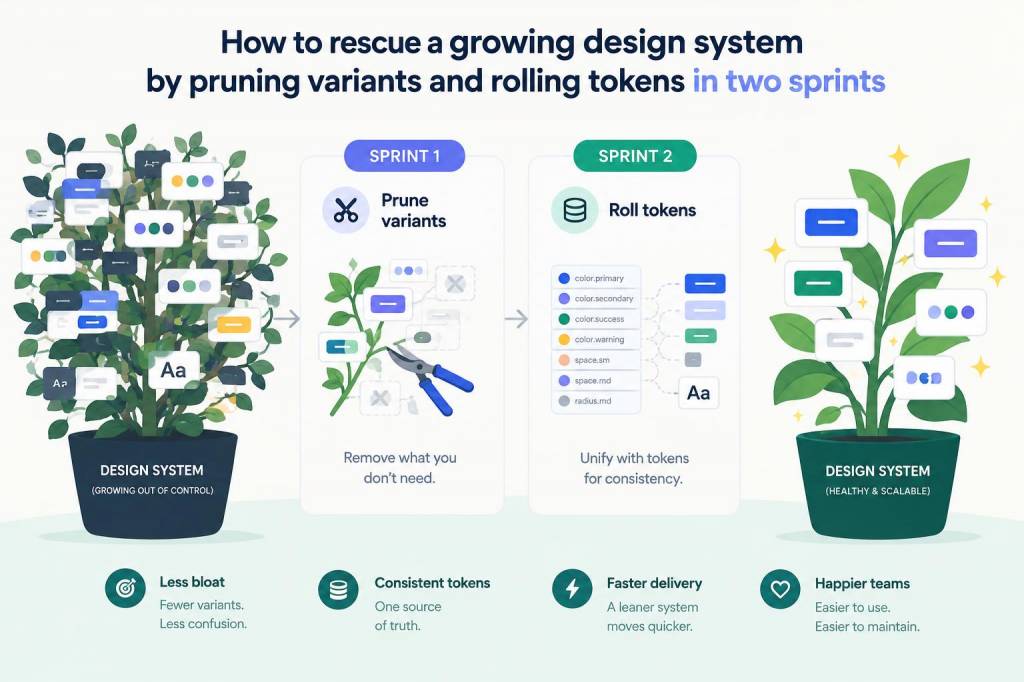
I inherited a design system that had become unwieldy: hundreds of component variants, a creeping palette of colors with subtle duplicates, and a token file that felt more like a historical archive than a source of truth. We didn't have months to rebuild from scratch, but we did have two sprints and a clear goal: make the system predictable, usable, and faster for teams to iterate on. I focused on two surgical moves that deliver outsized value quickly—pruning variants and rolling tokens—and landed them in two focused sprints.
Why pruning and token rolling matter
Design systems rot when small, ambiguous decisions multiply. Teams create new variants to solve one-off needs: a slightly different button padding here, an alternate primary color there. Over time these variations become noise. Pruning variants reduces cognitive load for designers and engineers, improves component reusability, and simplifies documentation.
Rolling tokens—consolidating, normalizing, and replacing ad-hoc style values with purposeful tokens—gives you a single source of truth for color, spacing, typography, and elevation. Tokens make global theming, accessibility fixes, and product-level changes much faster. Together, pruning variants and rolling tokens make components smaller, more consistent, and easier to maintain.
How I scoped the two-sprint plan
I wanted visible value by the end of each sprint. The first sprint was about discovery and surgical pruning—remove the worst offenders and create guardrails. The second sprint focused on token work—establishing a minimal token set, mapping values, and rolling them into code and Figma components.
High-level scope:
Sprint 1 (Discovery + Prune): audit, prioritize, prune, and stabilize key componentsSprint 2 (Tokens + Rollout): define tokens, map current values, roll tokens into components and code, and ship documentation/usage guidanceSprint 1 — Audit and surgical pruning
This sprint is about quick wins. I structured the work around three direct goals: identify the worst offenders, prune confidently, and create rules that prevent recurrence.
Day 1–2: Component audit
Inventory components in Figma and Storybook (or your living documentation source).Capture variant counts, usage patterns (via analytics, GitHub issue history, or Figma file comments), and who owns what.Flag components with highest variant bloat: buttons, inputs, badges, and cards often top the list.Day 3–5: Prioritize and prune
Make pruning decisions collaboratively—pull in a product designer and an engineer for each component. Discuss which variants are truly necessary (primary, secondary, outline, disabled, loading), and which are one-off visual explorations that never shipped.Prune aggressively but transparently: move removed variants into an “archived-variants” page in Figma and an archived story in Storybook. This gives a safety net if something was mistakenly removed.Create a simple variant policy: each component should have no more than N public variants, and any new variant requires a PR with justification and tests.End of sprint deliverables
Pruned Figma component library and Storybook with fewer, well-documented variants.A short variant policy (1–2 pages) and a changelog entry documenting what was removed and why.A list of components ready for tokenization next sprint.Sprint 2 — Define tokens and roll them into the system
With the component surface reduced, token rollout becomes tractable. The goal is not to create every possible token—it's to establish a minimal, meaningful set that unlocks consistency and theming.
Day 1: Token strategy and scope
Decide token categories: core colors, semantic colors, spacing scale, type scale, radii, elevation/shadows, and motion durations.Choose token format and tooling. I prefer a JSON-based design token system (using Style Dictionary or Figma Tokens) because it's easy to transform into platform-specific tokens (CSS variables, SCSS, iOS/Android).Set naming conventions—use semantic names where possible (e.g., color-bg-primary, color-text-muted) and a numbered scale for spacing/type.Day 2–4: Mapping and normalization
Map existing design values to tokens. For each component identified in Sprint 1, list the current values in a table: color, padding, font-size, border-radius, shadow. | Component | Current Value | Token |
|---|
| Primary Button | #0B6EFF | color-brand-500 (mapped) |
| Card Shadow | 0 8px 16px rgba(11,110,255,0.08) | elevation-02 |
Consolidate similar values: if three different blues are used for primary UI color at 98% similarity, pick one and alias the other usages to it.Address accessibility: run contrast checks (I like Contrast by The Paciello Group or Stark) and adjust token definitions where needed. If the brand color fails WCAG when used as text, create a semantic token (color-text-on-brand) that ensures legible contrast.Day 5–9: Implement and roll
Export tokens into the chosen tooling (Figma Tokens plugin, a tokens.json for Style Dictionary).Replace hard-coded values in Figma components with tokens (Figma Tokens or variables). Prioritize the components pruned in Sprint 1.Update Storybook components to consume tokens (CSS variables or a tokens file). For React, I typically map tokens to CSS custom properties at build time.Ship a small design-system release and communicate breaking changes—though pruning and tokenization are intended to be backward-compatible, explain how to adapt new usage patterns.Day 10: Validation and documentation
Run visual regression tests (Chromatic, Percy) for Storybook. Verify there are no visual regressions after token replacement.Publish a short guide: how tokens map to code, where to find token files, and how to request new tokens. Include recipes for common tasks (theme overrides, creating a new semantic token).Common pitfalls and how I avoided them
Going too broad: I fought the urge to tokenise everything. We started small—core colors, spacing, type scales—then iterated.Not involving engineers early: token format decisions need engineering buy-in. I used small pairing sessions to align on tooling and export paths.Removing variants without a rollback: archiving removed variants kept stakeholders comfortable and allowed quick restores if needed.Tips for maintaining momentum after the sprints
Add a pre-merge checklist that enforces token usage (lint rules or a design review gate).Celebrate the wins: show before/after screenshots and metrics (reduced variant count, faster component reuse, fewer visual bugs reported).Schedule quarterly audits: prune again before variant bloat returns and evolve tokens as the product grows.Two sprints won't solve every design system problem, but they can create a lasting structural improvement. Pruning declutters the surface; tokens give you the scaffolding to build reliably. Combined, they make your system feel purposeful again—more predictable for designers, simpler for engineers, and ultimately faster for your whole team to ship.